

Security policies
Configure the security policies applied platform-wide. On each screen, change values and Save; use Reload to revert to saved values.
- Path: IAM › Security policies
Scope
Security policies in System Mode IAM apply to the System Domain and govern authentication for system administrator (SysAdmin) accounts. When unset, IAM defaults apply. (Authentication policies for regular domains are managed per-domain by each Domain Admin.)
Login policies
Configure password rules and account lockout policy.
Sidebar (SNB)
From the left sidebar, move to each IAM screen (Home, System administrators, Domains, policies, Active sessions, Event logs).
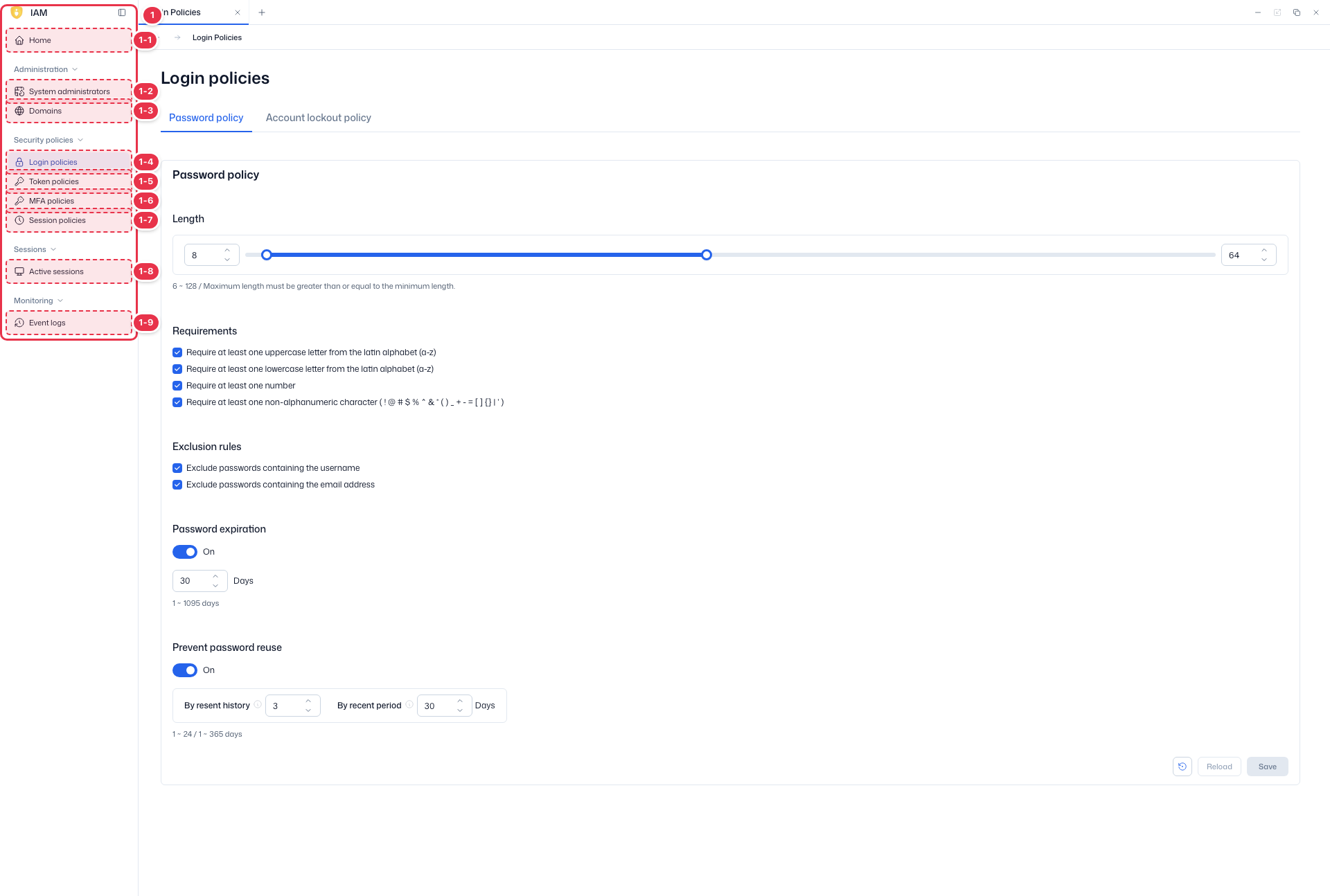
| No. | Feature | Item | Description |
|---|---|---|---|
| 1-1 | Home | Home | · Dashboard of domain status, authentication, users, and recent events. |
| 1-2 | System administrators | System administrators | · View, create, and delete system administrator accounts. |
| 1-3 | Domains | Domains | · View and create platform domains (tenants). |
| 1-4 | Login policies | Login policies | · Password and account lockout policies. |
| 1-5 | Token policies | Token policies | · General policies such as token lifetime. |
| 1-6 | MFA policies | MFA policies | · MFA enforcement and methods. |
| 1-7 | Session policies | Session policies | · General session policies such as session lifetime. |
| 1-8 | Active sessions | Active sessions | · View and terminate active sessions. |
| 1-9 | Event logs | Event logs | · View IAM event logs. |
Tabs · Settings
Configure login policies across two tabs. Save after changes.
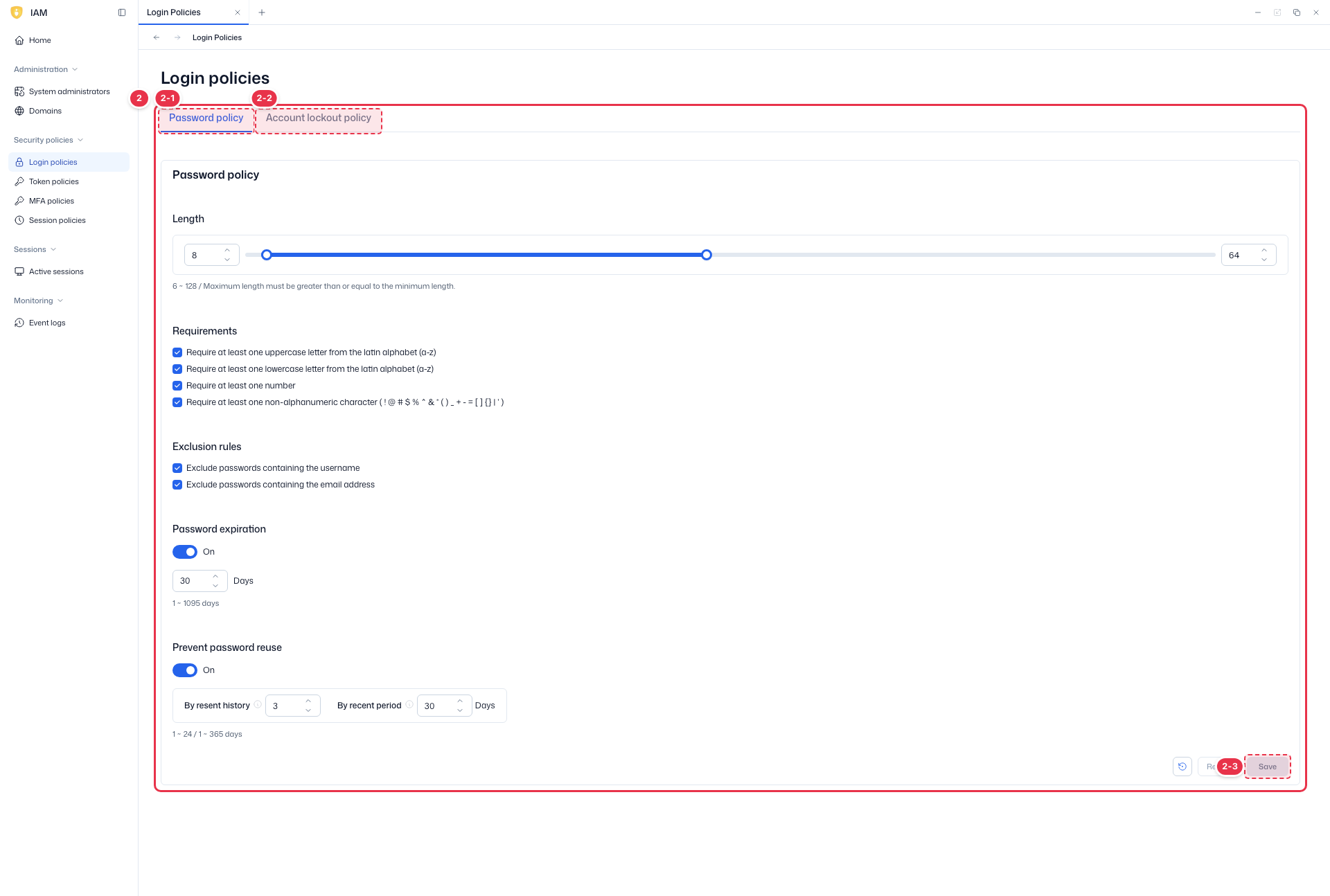
| No. | Feature | Item | Description |
|---|---|---|---|
| 2-1 | Password policy | Password policy | · Length, requirements (upper/lowercase, number, special char), exclusion rules, expiration, and reuse prevention. |
| 2-2 | Account lockout policy | Account lockout policy | · Account lockout rules on repeated login failures. |
| 2-3 | Save | Save / Reload | · Save: save the policy. Reload: revert to saved values. |
Password policy
| Item | Default | Range |
|---|---|---|
| Length (min / max) | 8 / 64 | 6–128 |
| Requirements | — | choose whether to require uppercase, lowercase, number, special char |
| Exclusion rules | off | forbid password containing username / email |
| Password expiration | On · 30 days | 1–1,095 days |
| Prevent reuse | On · last 3 / 30 days | history 1–24 · period 1–365 days |
Account lockout policy
Locks an account after accumulated login failures. Three lockout types:
- Lockout temporarily — auto-released after a wait (default).
- Lockout permanently — locked until an admin releases it (status becomes Locked; release requires a password reset).
- Lockout permanently after temporary lockout — converts to permanent after exceeding the temporary-lockout count.
Key values: Max Login Failures default 5 (1–100), wait increment 10 min, max wait 60 min, failure reset 12 h. An email is sent to the account on lockout.
Token policies
Sidebar (SNB)
From the left sidebar, move to each IAM screen (Home, System administrators, Domains, policies, Active sessions, Event logs).
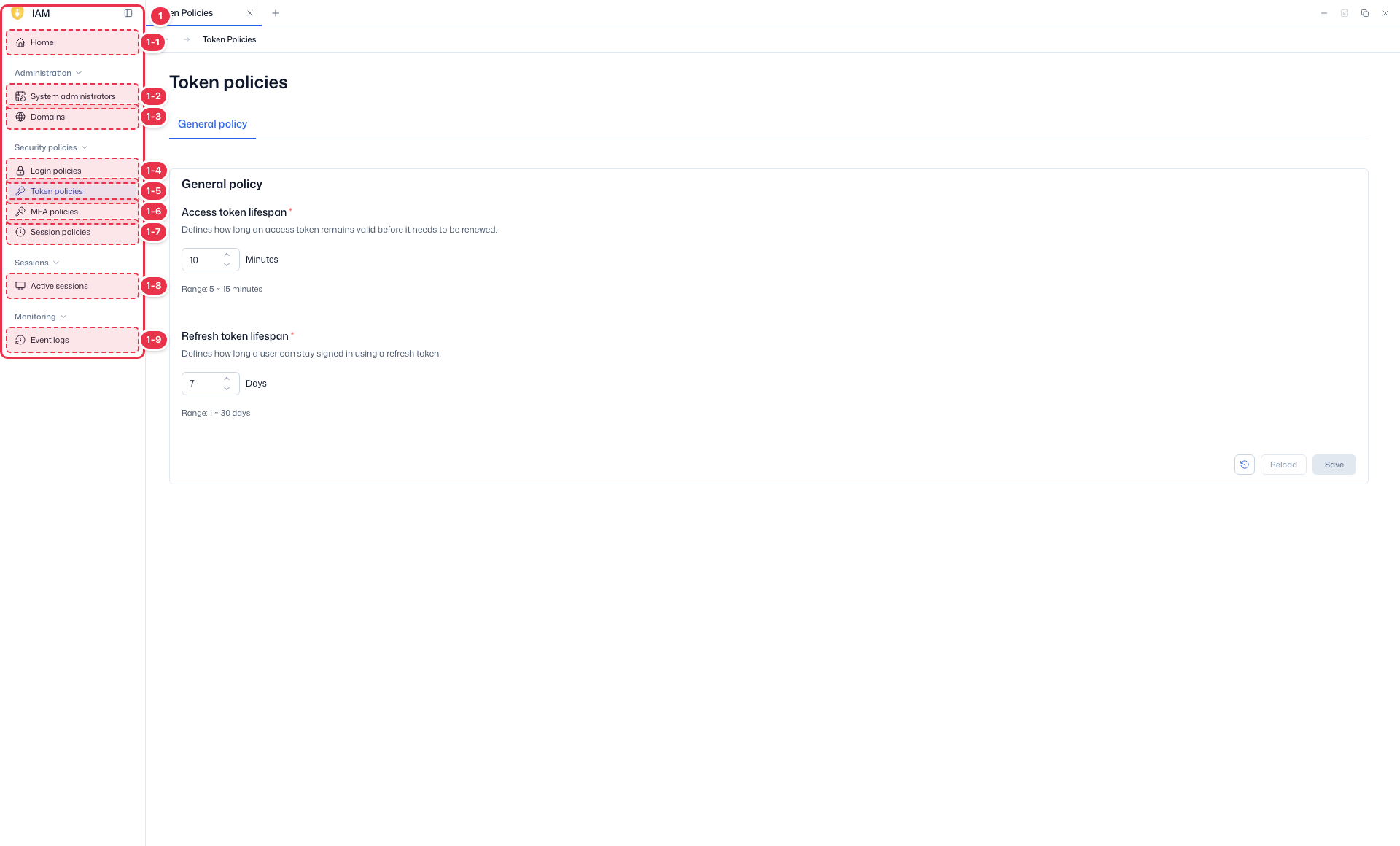
| No. | Feature | Item | Description |
|---|---|---|---|
| 1-1 | Home | Home | · Dashboard of domain status, authentication, users, and recent events. |
| 1-2 | System administrators | System administrators | · View, create, and delete system administrator accounts. |
| 1-3 | Domains | Domains | · View and create platform domains (tenants). |
| 1-4 | Login policies | Login policies | · Password and account lockout policies. |
| 1-5 | Token policies | Token policies | · General policies such as token lifetime. |
| 1-6 | MFA policies | MFA policies | · MFA enforcement and methods. |
| 1-7 | Session policies | Session policies | · General session policies such as session lifetime. |
| 1-8 | Active sessions | Active sessions | · View and terminate active sessions. |
| 1-9 | Event logs | Event logs | · View IAM event logs. |
Settings
Configure general token policies such as token lifetime, then Save.
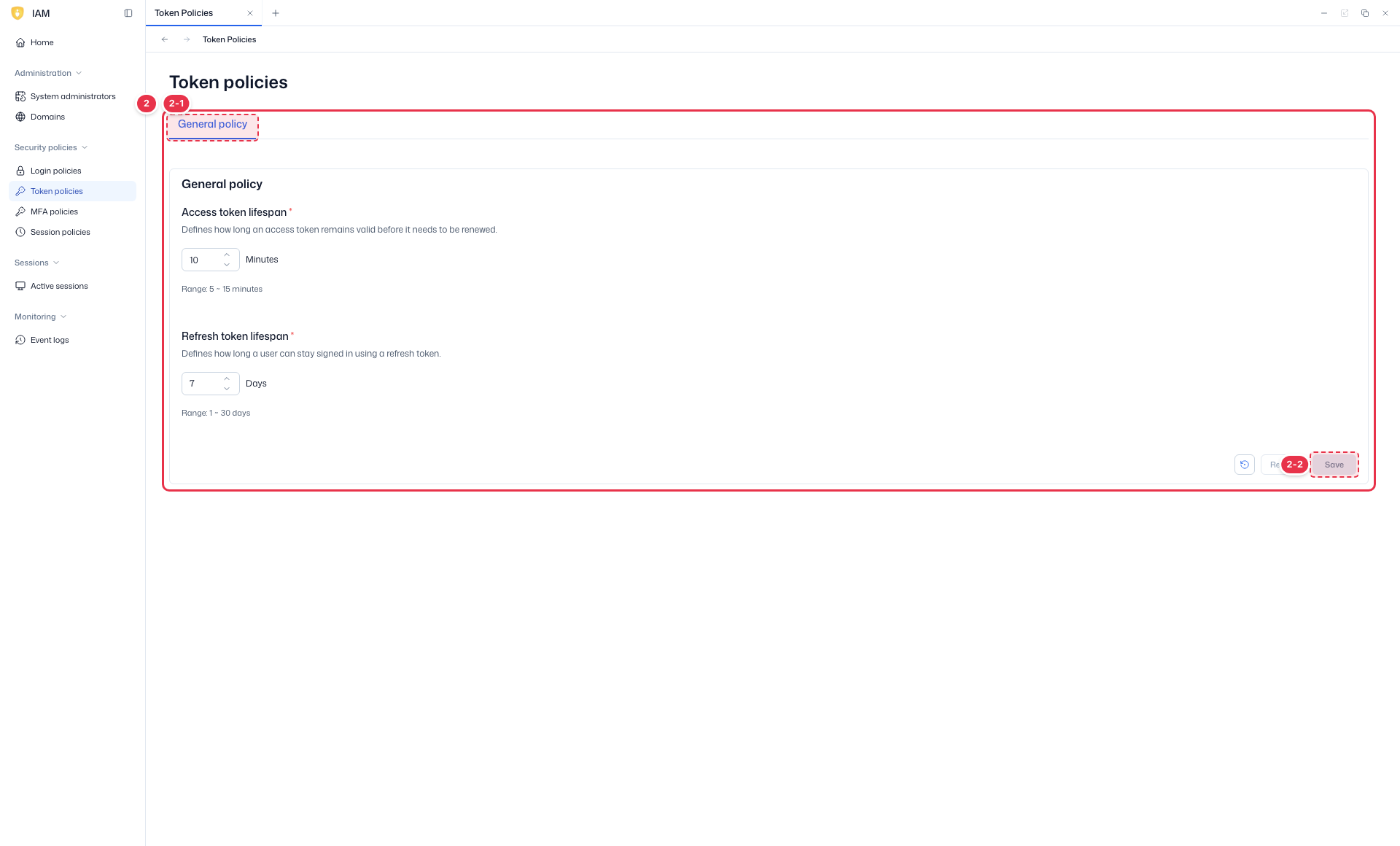
| No. | Feature | Item | Description |
|---|---|---|---|
| 2-1 | General policy | General policy | · Token policies such as access/refresh token lifetime. |
| 2-2 | Save | Save / Reload | · Save: save. Reload: revert. |
| Item | Default | Range |
|---|---|---|
| Access Token Lifespan | 10 min | 5–15 min |
| Refresh Token Lifespan | 7 days | 1–30 days |
Token · session relationship
Keep the Access Token lifespan shorter than Session Idle Timeout, and the Refresh Token lifespan longer than Session Max Lifespan (prevents tokens outliving a session and UI drop-outs mid-session).
MFA policies
Sidebar (SNB)
From the left sidebar, move to each IAM screen (Home, System administrators, Domains, policies, Active sessions, Event logs).
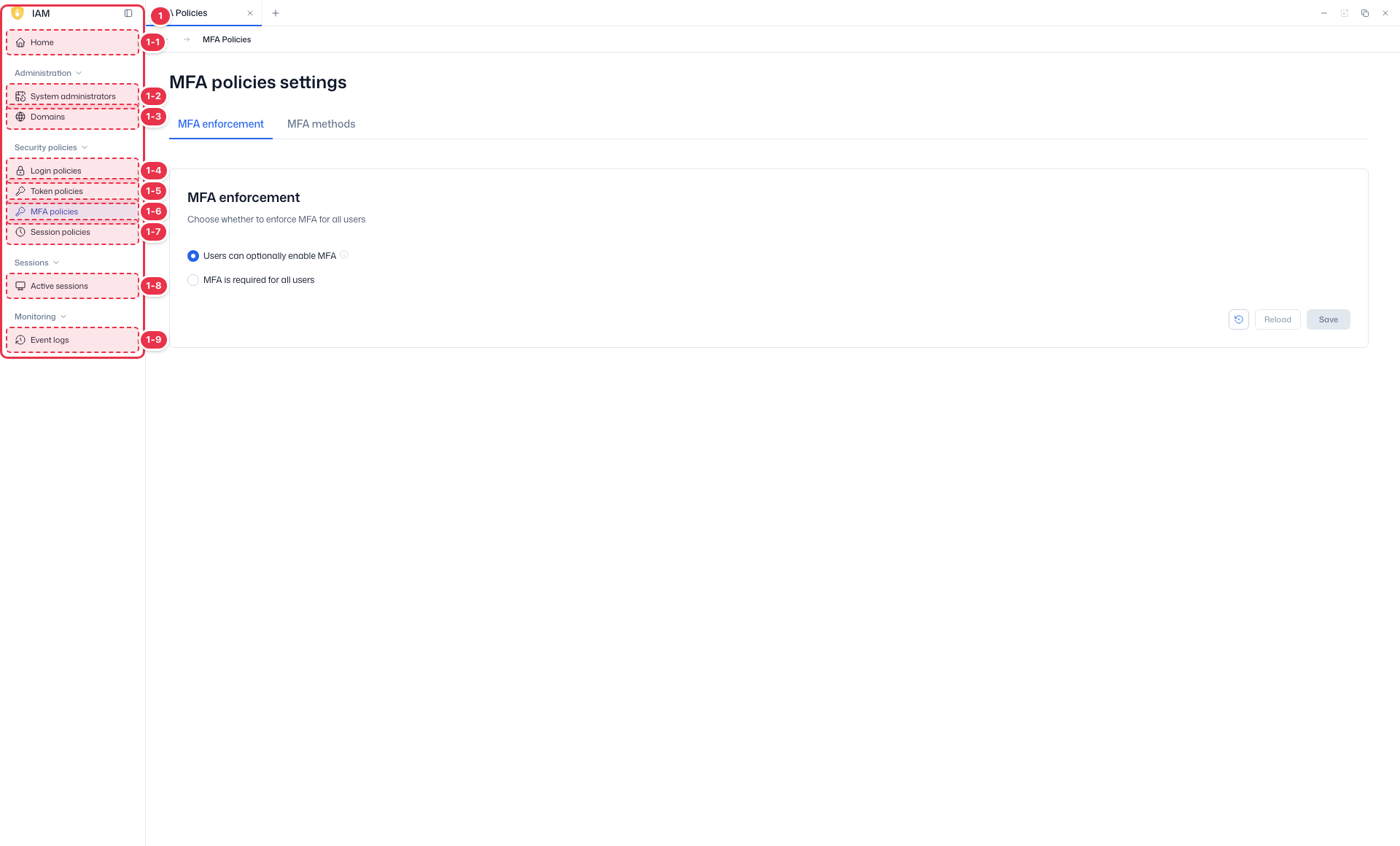
| No. | Feature | Item | Description |
|---|---|---|---|
| 1-1 | Home | Home | · Dashboard of domain status, authentication, users, and recent events. |
| 1-2 | System administrators | System administrators | · View, create, and delete system administrator accounts. |
| 1-3 | Domains | Domains | · View and create platform domains (tenants). |
| 1-4 | Login policies | Login policies | · Password and account lockout policies. |
| 1-5 | Token policies | Token policies | · General policies such as token lifetime. |
| 1-6 | MFA policies | MFA policies | · MFA enforcement and methods. |
| 1-7 | Session policies | Session policies | · General session policies such as session lifetime. |
| 1-8 | Active sessions | Active sessions | · View and terminate active sessions. |
| 1-9 | Event logs | Event logs | · View IAM event logs. |
Tabs · Settings
Configure MFA policies across enforcement and methods tabs. Save after changes.
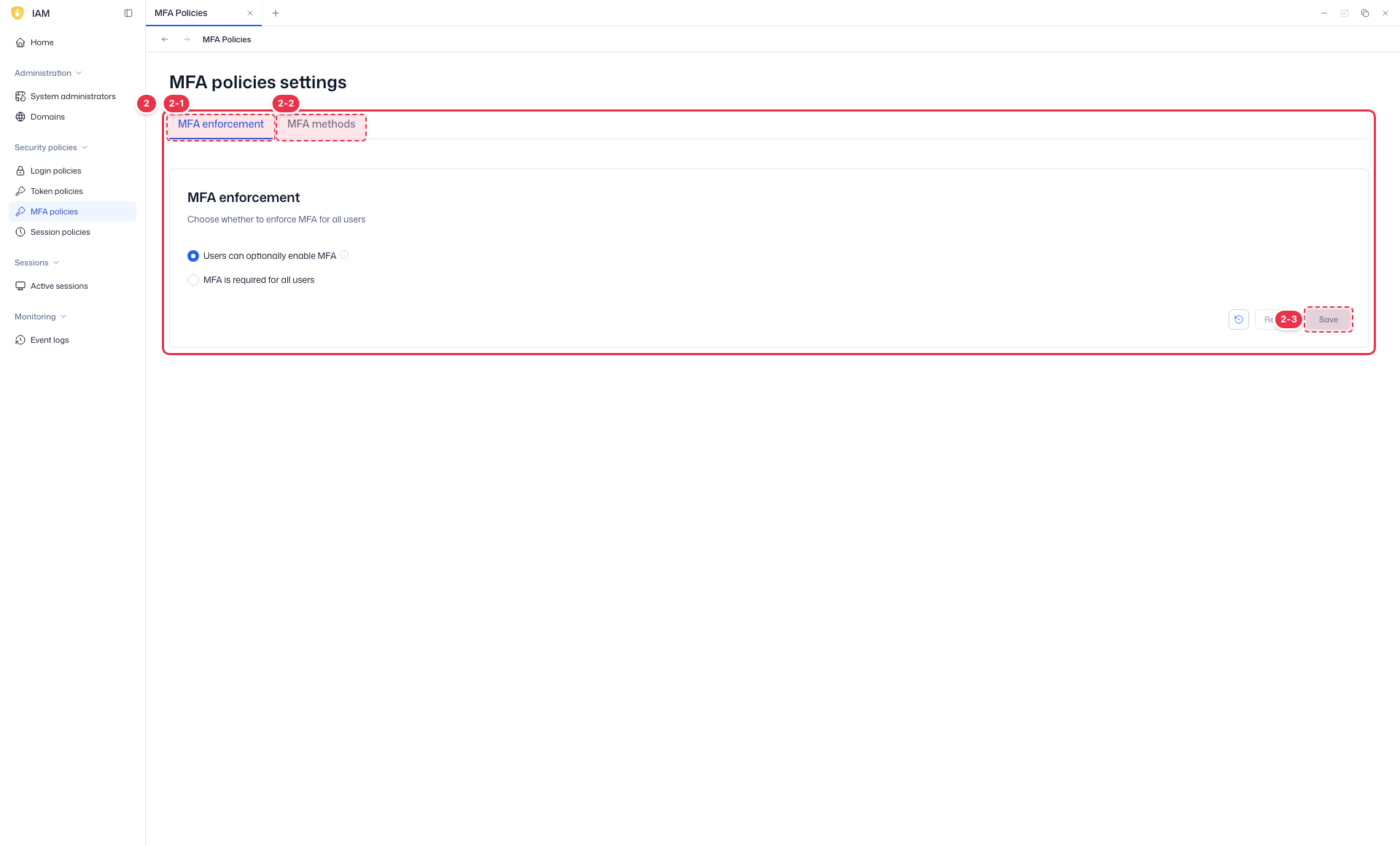
| No. | Feature | Item | Description |
|---|---|---|---|
| 2-1 | MFA enforcement | MFA enforcement | · When and for whom MFA is enforced. |
| 2-2 | MFA methods | MFA methods | · Allowed MFA methods (TOTP, etc.). |
| 2-3 | Save | Save / Reload | · Save: save. Reload: revert. |
- MFA enforcement: Voluntary (user chooses, default) or Required for all users (mandatory — users without MFA are forced to register at next sign-in).
- MFA methods: toggle OTP (TOTP; Google/Microsoft Authenticator, etc. · 6 digits · 30 s) and Email (code digits, validity, resend cooldown, attempt limits) on/off.
Session policies
Sidebar (SNB)
From the left sidebar, move to each IAM screen (Home, System administrators, Domains, policies, Active sessions, Event logs).
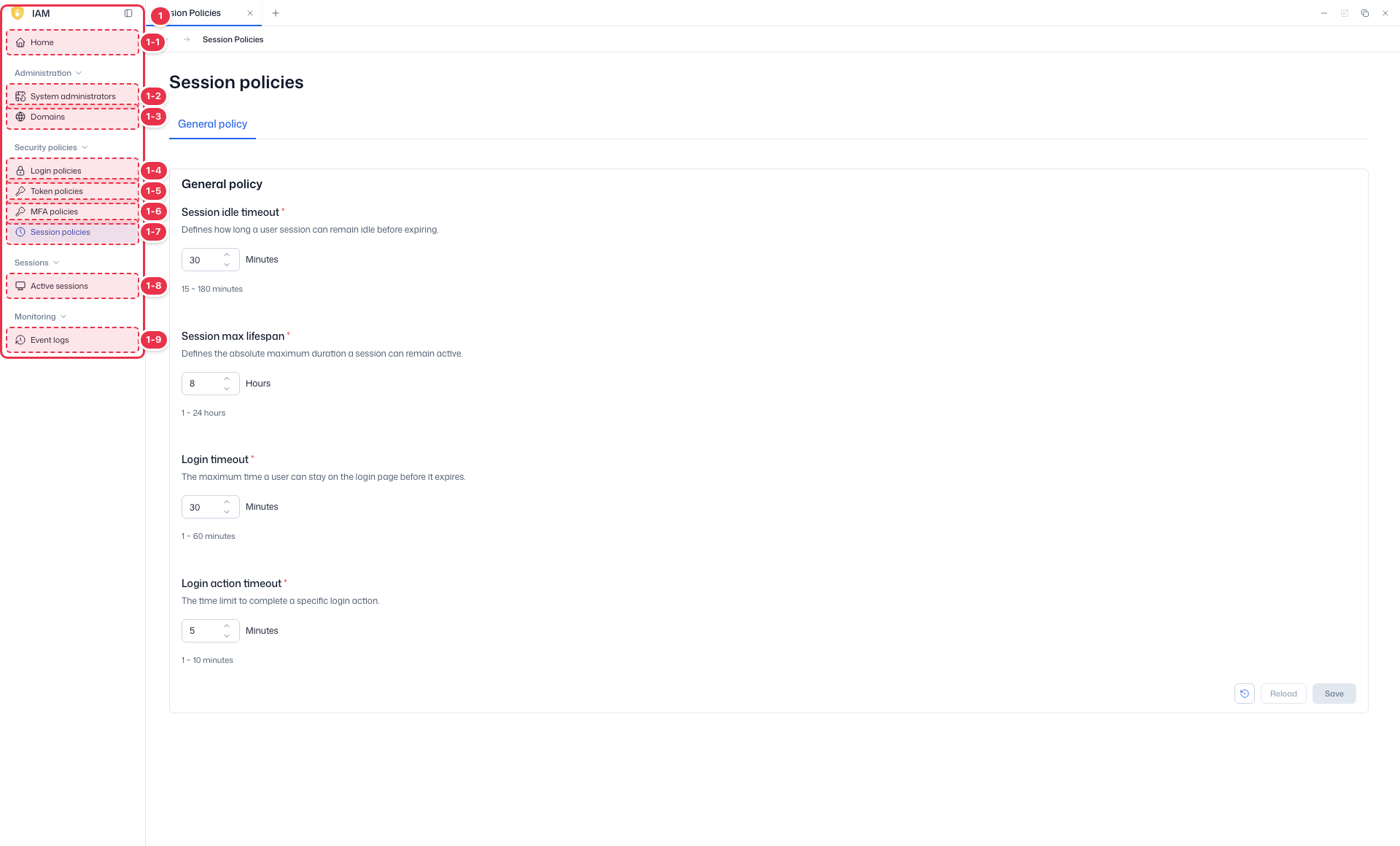
| No. | Feature | Item | Description |
|---|---|---|---|
| 1-1 | Home | Home | · Dashboard of domain status, authentication, users, and recent events. |
| 1-2 | System administrators | System administrators | · View, create, and delete system administrator accounts. |
| 1-3 | Domains | Domains | · View and create platform domains (tenants). |
| 1-4 | Login policies | Login policies | · Password and account lockout policies. |
| 1-5 | Token policies | Token policies | · General policies such as token lifetime. |
| 1-6 | MFA policies | MFA policies | · MFA enforcement and methods. |
| 1-7 | Session policies | Session policies | · General session policies such as session lifetime. |
| 1-8 | Active sessions | Active sessions | · View and terminate active sessions. |
| 1-9 | Event logs | Event logs | · View IAM event logs. |
Settings
Configure general session policies such as session lifetime and concurrent sessions, then Save.
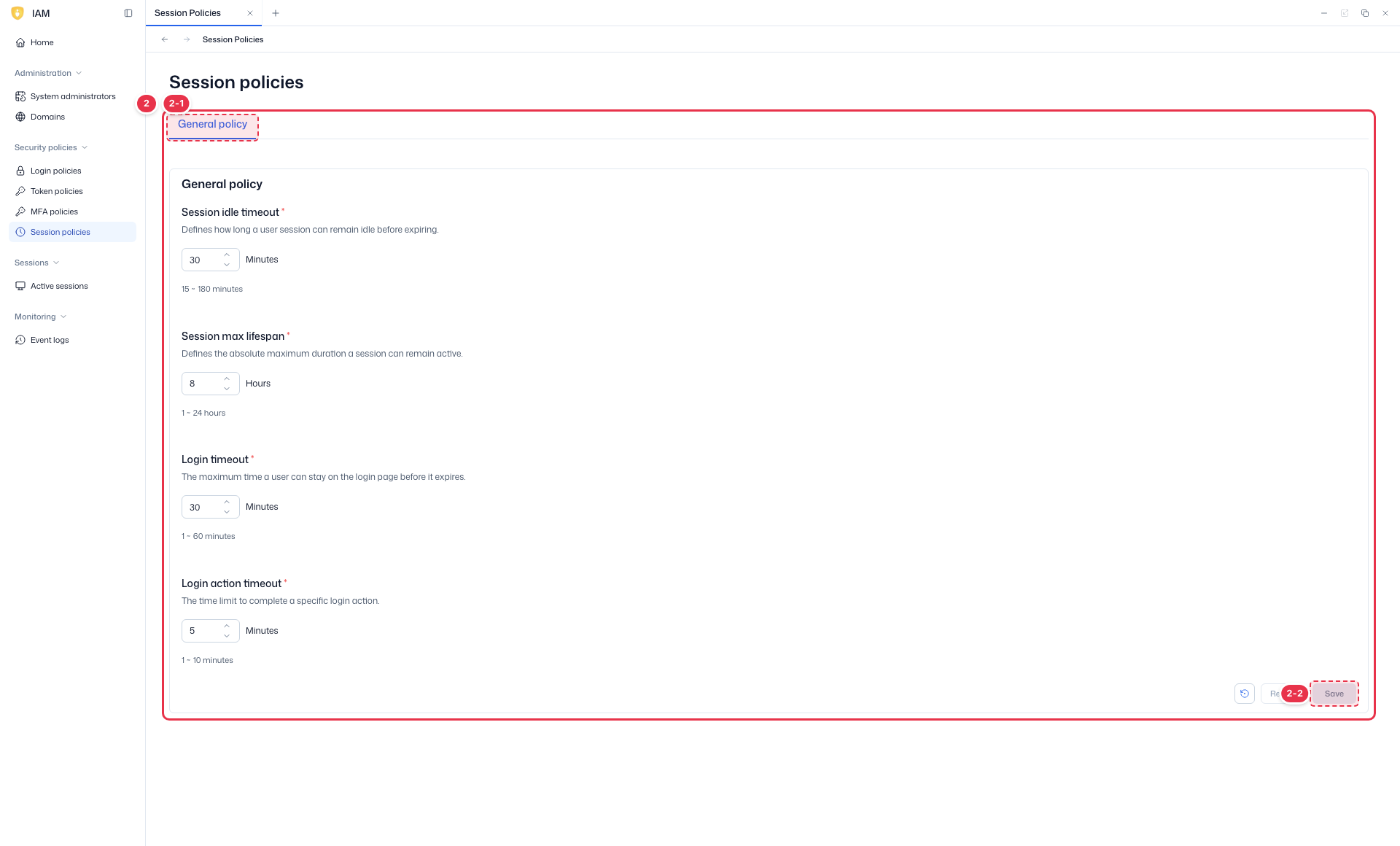
| No. | Feature | Item | Description |
|---|---|---|---|
| 2-1 | General policy | General policy | · Session policies such as session lifetime. |
| 2-2 | Save | Save / Reload | · Save: save. Reload: revert. |
| Item | Default | Range |
|---|---|---|
| Session Idle Timeout | 30 min | 15 min–3 h |
| Session Max Lifespan | 8 h | 1–24 h |
| Login Timeout | 30 min | 1–60 min |
| Login Action Timeout | 5 min | 1–10 min |
- Session Idle Timeout: inactivity time before expiry. Session Max Lifespan: absolute maximum lifetime regardless of activity.
Next steps
- Active sessions — manage active sessions
- Event logs — review policy-change/authentication events