

Server Groups (Admin)
Administrators can manage server group policies across tenants.
Sidebar (SNB)
The Compute group in the left sidebar of Compute Admin. It manages the resources of all tenants in one place, and clicking an item opens that resource screen.
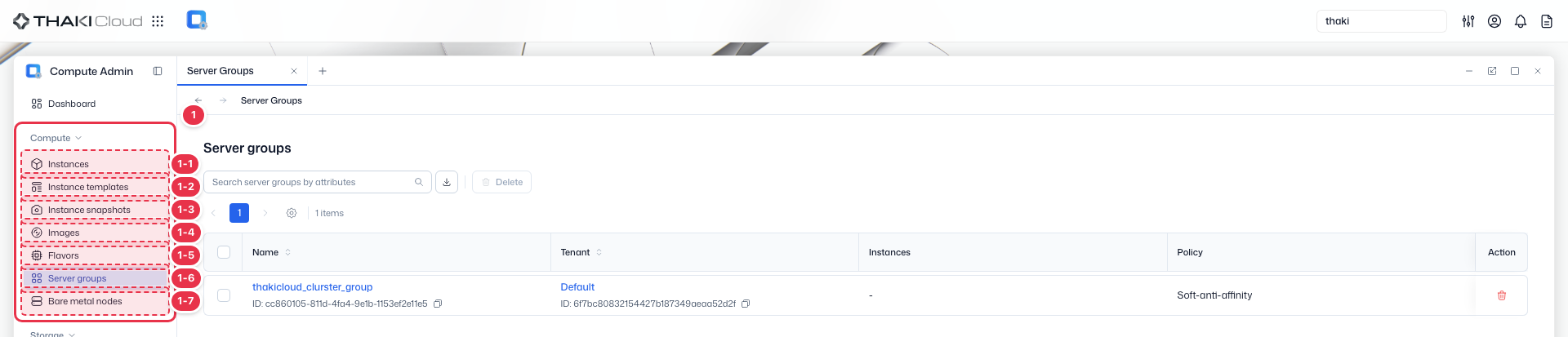
| No. | Feature | Item | Description |
|---|---|---|---|
| 1-1 | Compute | Instances | · Lists and operates the instances (VMs and bare metal) of all tenants in one place. |
| 1-2 | Compute | Instance Templates | · Manages instance creation templates across tenants. |
| 1-3 | Compute | Instance Snapshots | · Lists and manages instance snapshots (images). |
| 1-4 | Compute | Images | · Manages the OS images used to create instances. |
| 1-5 | Compute | Flavors | · Defines and manages the vCPU, memory, and disk specifications (flavors). |
| 1-6 | Compute | Server Groups | · Manages groups that apply an instance placement policy (affinity/anti-affinity). |
| 1-7 | Compute | Bare Metal nodes | · Manages the inventory and status of bare metal physical nodes. |
Title header
The content header that shows the title of the current screen (Server groups).

Search · Toolbar
The area for searching the list, exporting to CSV, and running bulk actions on the selected items. An administrator works on the resources of all tenants without selecting a tenant.

| No. | Feature | Item | Description |
|---|---|---|---|
| 3-1 | Search | Attribute search field | · Filters the list by attributes such as name, ID, tenant, and status. |
| 3-2 | Export | Download CSV | · Exports the current list as a CSV file. |
| 3-3 | Bulk action | Delete | · Deletes the selected items (a confirmation modal appears). |
List
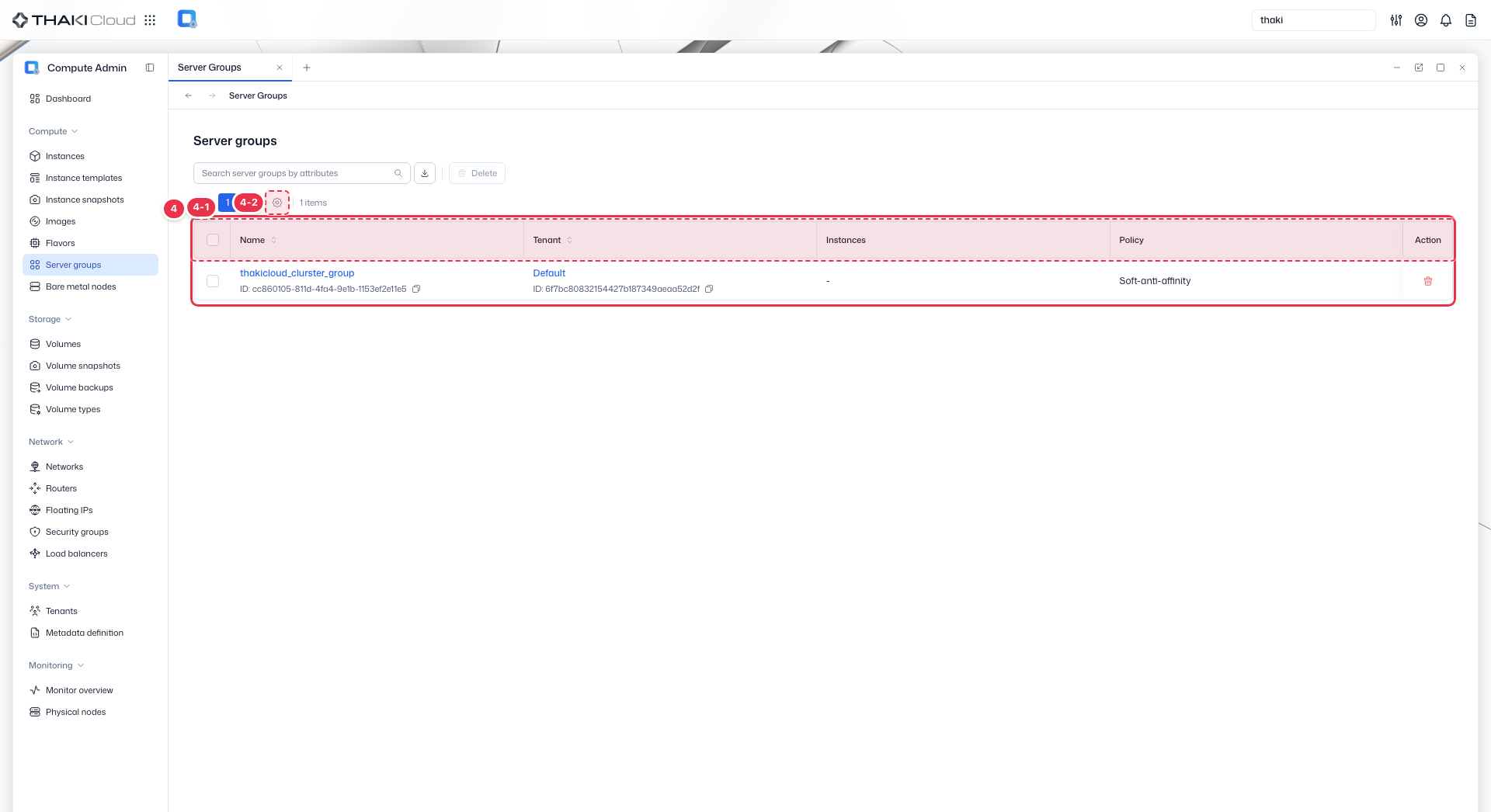
A table that shows the server groups of all tenants with their owning tenant, number of instances, and placement policy.
| No. | Feature | Item | Description |
|---|---|---|---|
| 4-1 | List columns | Name | The server group name and ID. |
| Tenant | The owning tenant and its ID. | ||
| Instances | The number of instances in the group. | ||
| Policy | The placement policy (Soft-anti-affinity and so on). | ||
| Action | A Delete button on the row. | ||
| 4-2 | View settings | View preferences button | · Opens the View Preferences drawer, where you choose which columns to show. |
Key features
- Cross-tenant view: View server groups across all projects
- Search and filter: Find groups by name or tenant
- Policy types: Review anti-affinity, affinity, and soft policies
- Member tracking: See which instances belong to each group
Policy types
| Policy | Description |
|---|---|
| anti-affinity | Place members on different hosts |
| affinity | Place members on the same host |
| soft-anti-affinity | Prefer different hosts, not enforced |
| soft-affinity | Prefer the same host, not enforced |
Available actions
Above the list is the bulk button Delete, which becomes active when you select rows. The Action cell of each row has a Delete button directly, with no menu.
| Action | Description |
|---|---|
| Delete | Permanently remove server group |
Placement policy
Server groups control instance placement during scheduling. Once created, the policy cannot be changed.